Here’s a typical scenario: Say you have a WordPress blog and wanted to highlight certain posts (blog entries) on the home page to show up with a different background color or other styling like a border to draw more attention to these posts.
So how do you do that? With WordPress it’s surprisingly easy to do and it’s a good way for beginners to start theme hacking. As always make sure you have a backup copy of your original theme file that you can re-upload via FTP in case something goes wrong.
In this example, let’s say that you want posts for “events” to have a slightly gray background.
So the first thing is to mark all your post(s) with the “events” category in the WP admin post editor.
Then you would go to Appearance -> Editor and select the “style.css” file (or if you’re using something like Pagelines or WooThemes, go to your theme control panel’s custom CSS editor page).
Then you’d add something like this to the bottom of your CSS file.
.category-events
{
background-color: #e9e9e9;
padding:5px 10px 5px 10px;
}
And voila, if the CSS class matches the actual “slug” name being generated by WordPress, all the “events” posts on the home page will have a light gray background.
The important thing is that the CSS class (e.g; .category-events) matches the WordPress slug for that category. Sometimes if you have previously deleted that category and re-created it, WordPress will add “-2” to the end of that slug. You can tell what the slug name is by looking in the slug column in Posts -> Categories. Unfortunately other than directly editing the MySQL database there’s no easy way to rename or delete category slugs.
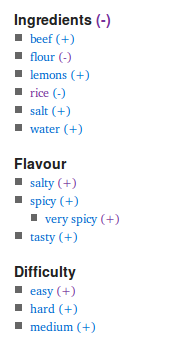
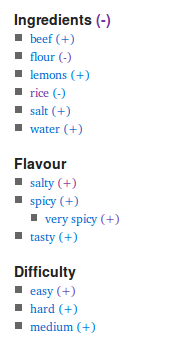 Here’s an excellent WordPress plugin for sites that have a lot of categories and tags for posts. You can use Taxonomy Drill-Down to either a widget on the sidebar which displays a faceted search box. The widget shows plus and minus signs for categories/tags, allow your visitor to drill down to a filtered set of posts matching their criteria.